
Build Your First Web Crawler
Explore the Unknown and Learn to Gather Your Own Data

Hello everyone! July and August have been great months for me and my company. Here’s a few updates:
GrooveSeeker iPhone App released (Please Download! Tell your friends, too!)
GrooveSeeker Android App released (Please Download! Tell your friends, too!)
Four training courses were taught!
Building Investigative AI Agents using GraphRAG (Packt)
One new course was added!
Two book deals are being worked on. I will choose one.
We’ve also fully redesigned our websites:
I had a great time creating the course material and providing the training. I taught people from all different ages and skill levels. It was a great time, and I’ve really enjoyed getting to know everyone who enrolled.
We will be giving our courses again starting in September 2026. Classes are already filling up. We already have students in all four of our upcoming classes. Sign up for a bundle to save money! Sign up for all four classes to save 40%!
I am writing today’s article especially for one student I have in mind. I have one student who is curious about OSINT and is just starting out, so rather than write a complicated article, I wanted to write as simple of an article as I can today. I want to show you how you can build your first web crawler from scratch. This might be the very first OSINT work you ever do!
Build Your First Web Crawler
Today’s article will be for all readers including free readers. I want to show you beginner fundamentals. If you would like to go further, I have already written more than 100 articles on this blog, and paying readers get access to everything. If you want to go further, upgrade your subscription so that you can read premium OSINT articles.
Push that button and upgrade to whatever plan you are comfortable with. Please support my hard work. Think of it as my tip jar. I provide a lot of value with this blog. Seriously, do it, please.
First, here is today’s code. I will explain it in this article.
What even is a Web Crawler? Well, humans visit websites using Web Browsers such Google Chrome and others. Computer programs visit websites using Web Crawlers. You can think of a Web Crawler as a computer program that visits websites and returns information about those websites.
You can think of a web crawler as a computer program that visits websites and returns information about those websites.
Why do this? Why build Web Crawlers? There are several good reasons:
Explore the unknown. There are billions of websites.
Gather your own data. If you do, you can learn anything.
Investigate things at scale. Understand how the internet moves and evolves.
Change your relationship with the internet itself.
The second and fourth are most important. When I learned to crawl the web, it unlocked and supercharged all of my Data Science learning. I no longer needed to use Kaggle Datasets. I no longer needed to use stale open datasets. My Natural Language Processing and Graph Analysis learning was supercharged by learning Web Crawling. That is a fact, and I am trying to help you in the same way.
You have to learn to walk before you can run. You have to learn to crawl one website before you can map out the internet like I have done.
Learning to crawl the web fundamentally changes your relationship with the internet itself. You evolve from being a consumer to being able to analyze, understand, and even act on the latest insights, potentially before anyone else. That can even lead to competitive advantage.
Challenge 1: Simple Crawler
A simple web crawler can be built in three lines of code.
import requests

url = 'https://cnn.com'
html = requests.get(url).text
Requests is an extremely important Python library for doing any web crawling. Familiarize yourself with requests.
In the second line of code, I am putting a web address into a URL variable.
In the third line of code, I tell the requests code to visit the URL and give me the text from the website. The text is HTML.

See, if I inspect the first 500 characters of the html variable, I can see that this is HTML data. You can see it in the <!DOCTYPE html>.
But this is only the very beginning of Web Crawling. If you want to do anything useful with the data, you need to extract information and context from the HTML, so let’s go further. In this article, I will go further and further. That way, you can experiment at your own pace and build up proficiency.
So, challenge 1 is to get a simple crawler working. Try it out! You are not limited to cnn.com. You can change out the URL.
Challenge 2: Extended Crawler
HTML is source material from crawling. HTML by itself is not very useful. You’ll typically want to extract information and insights from the HTML data. Let’s begin moving in that direction. Let’s add BeautifulSoup so that we can start getting more useful data. This is Data Mining and Data Enrichment.
import requests
from bs4 import BeautifulSoup

url = 'https://cnn.com'

html = requests.get(url).text
soup = BeautifulSoup(html, "html.parser")
This code is a bit more advanced than the original Web Crawler code. Now we have added BeautifulSoup, a popular Python Library for extracting context from HTML data. Notice that I still use requests for the crawl and that I use BeautifulSoup after the crawl has taken place. What is the crawl step?
html = requests.get(url).textThat is the crawl step. Everything below that is Data Mining and Data Enrichment. What is the next line?
soup = BeautifulSoup(html, "html.parser")This line gives BeautifulSoup the HTML text so that the html.parser can parse stuff out of it. Today’s Software Engineers are so lucky. I remember building HTML parsers in the late 1990s using Perl and PHP. It was not nearly as easy as what I am showing you today. Once the data has been shown to BeautifulSoup, we can use the soup variable to do all kinds of things.
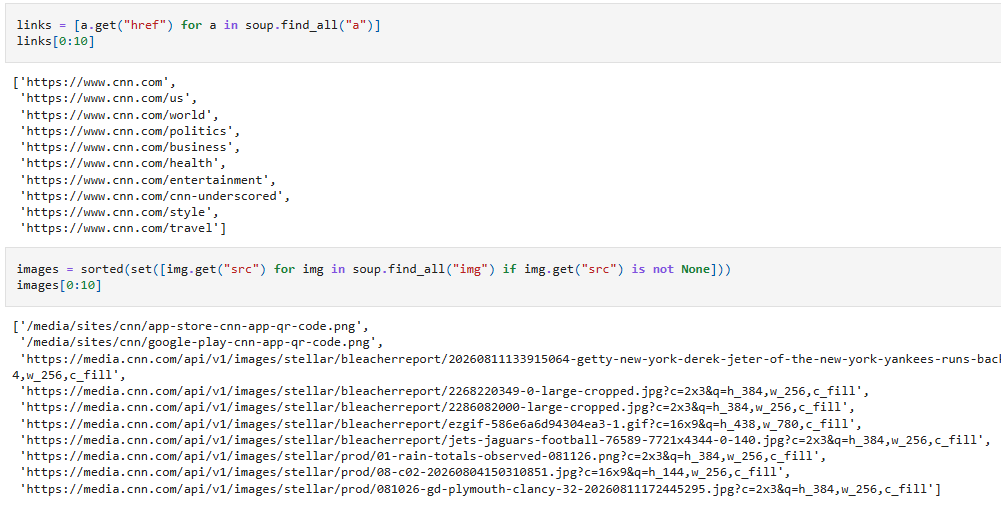
See. In the top code block, I have extracted all links from the HTML, and in the second code block, I have extracted all images from the HTML.
In other words, I have used a Web Crawler to pull all links and images from a website so that I can analyze them programmatically.
Let’s keep going. I’m not going to analyze data in this article, just show how to get data via Web Crawling.
Challenge 3: Full URL Context
This is where things get really fun. In today’s code, I have given away a powerful function that crawls a URL and returns rich context about what was found on that website. It uses BeautifulSoup and other Python libraries under the hood, and using it is this simple, after you have installed the Python libraries that you need. Work with your favorite Chat AIs or do Google Searches to figure out how to do the necessary installs.
url = 'https://cnn.com'

data = extract_web_text_context(url)
That’s it. You pass a URL to the extract_web_text_context() function and you get rich context in return. What is web text? HTML. What is context? Stuff that was found in the HTML. If I next run this:
data.keys()I can see that this context exists in the data variable:
dict_keys([’text’, ‘comments’, ‘page_title’, ‘links’, ‘images’, ‘domain’, ‘linked_domains’, ‘url’, ‘tokens’, ‘sentences’, ‘token_count’, ‘sentence_count’, ‘lexical_diversity’, ‘entropy’])Each one of those things is either data or a dataset. Let’s explore!
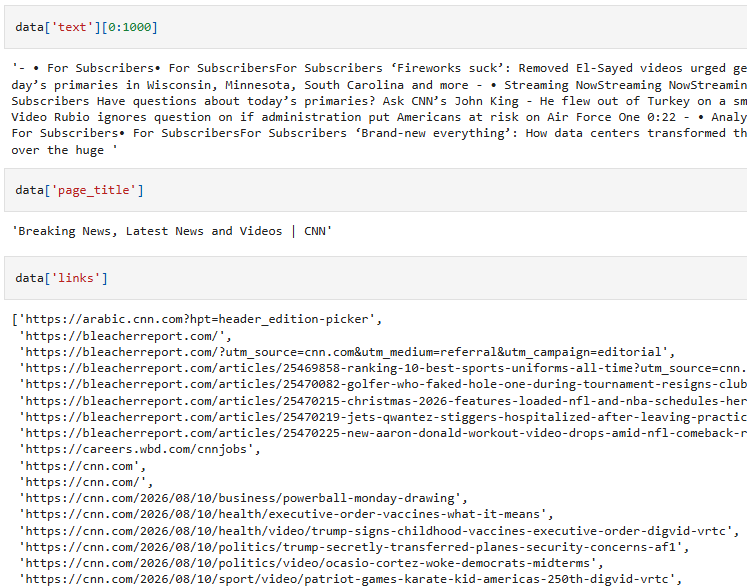
See, there is the full text from the web page, the page title, and the links.
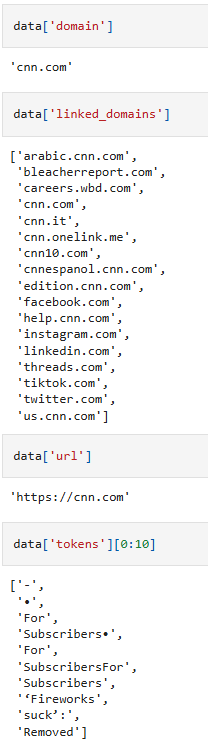
There is the domain I crawled, domains that it links to, and the first ten tokens from the website.
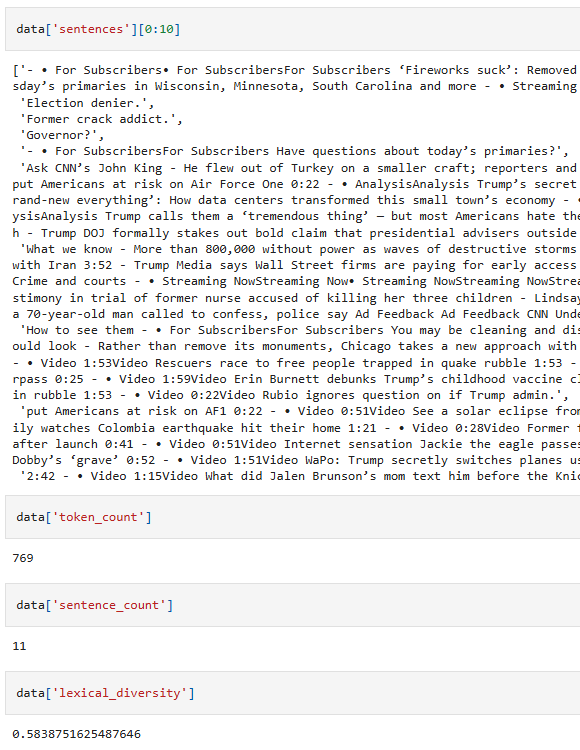
And here are the first ten sentences from the web page, the total token count, the total sentence count, and the lexical diversity. What is Lexical Diversity? Learn some Natural Language Processing. Challenge 4: Learn about Lexical Diversity. :)
Finally, the data is clean and standardized, making it easy to put into a DataFrame.

Why put the data in a DataFrame? Because it makes it easier to work with for Data Science workflows. What kinds of workflows? Read the other 100+ articles I have written to find out! Or read my book! You should really buy a copy of my book and read it. It was published three years ago and is STILL rated five stars out of five.
Mission Accomplished
That’s it! All I wanted to do today is give you all some code to experiment with your first web crawler. Do things ethically and legally. And here are some safety tips:
If you want to do this anonymously, use Google Colab, Deepnote, or a VPN
If you are going to crawl multiple websites, put a sleep(0.3) between the crawls. You do not need it if you are crawling different websites, but you should absolutely include it if you are crawling several URLs from the same website, so I recommend just building sleep(0.3) into your loops.
But we aren’t looping today, so you can ignore the second point for now. In today’s article, I show how to crawl one website. If you are just crawling big news websites, then you don’t need to hide your IP address. Basically, if you feel comfortable visiting that website with an actual web browser, then you do not need to crawl it anonymously.
But if you are doing some experimentation for OSINT or Cybersecurity, you may want to build out your prototype on Google Colab or Deepnote or use a VPN. That’s just good Cybersecurity, but extended to web crawling. If you don’t want your home IP address appearing in their web logs, crawl anonymously.
The easiest way to do that is to use Google Colab.
Paths to Explore
I have covered a lot of material and have intentionally avoided complicating this with a lot of detail. I wanted you to learn some fundamentals. If you want to go further, research these questions!
What is HTML?
What is Requests?
What is BeautifulSoup?
What is an HTML parser?
What is Data Mining?
What is Data Enrichment?
What is NLTK?
What is Natural Language Processing?
What is tokenization?
What is sentence tokenization?
What is lexical diversity?
What is entropy?
What is a Python dictionary?
What is a DataFrame?
What is a domain?
What are linked domains?
What is OSINT?
What is Network Analysis?
What is Data Science?
Feel free to leave comments, too! I’d love it if my readers talked to each other and learned from each other.
That’s All for Today! See You In Class!
What I am showing today relates to every class that I teach. If you are interested in web crawling, you should definitely enroll in my OSINT / Digital Detective classes. However, this is relevant to AI Architecture and Engineering as well. We have created class bundles to help you save money. Here’s what you should do!
Enroll in your preferred bundle
Classes will resume the first week in September. See you in class!
And if you are ready to give your AI interfaces world awareness, then buy access to my technologies.
That’s all for today! Have a great day!
Upgrade your subscription to go beyond the basics. I have already written more than 100 articles.